
WaHMap (for Hong Kong only)3.301 - Google Play
You'll be able to see results in few seconds.
Publisher Description


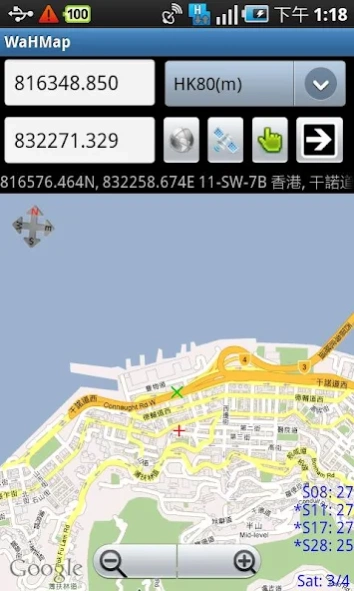

for Hong Kong only
Navigate Google Map by Hong Kong 1980 (HK80) Grid System Coordinates.
*Exclusively for use in Hong Kong
*Useful for Land Surveying related person
**Input Non-Hong Kong coordinates may causes
program "Force Close"
***Use GPRS / WIFI data (be careful!!!)
***For Android 1.6 or up
Functions:
Search Location by:-
(input the coordinates and click the "Arrow" button)
(Choose coordinate Type at dropdown list at upper right)
-Old Imperial Coord. (ft) [pre-1963]
-New Imperial Coord. (ft) [1963]
-GPS's WGS84 Geodetic Coord. (dd.mmss)
-Hong Kong Address
Get HK80 coords. by Clicking on the Map
(Turn on TAP function by click the "finger" button)
Current Position [Green Cross] by GPS
("Satellite" Button)
-Celluar Positioning [at the beginning]
-GPS / A-GPS Positioning [after the Celluar
Positioning]
-auto temporary switch back to Celluar Positioning if
GPS unavailable
Satellite View (Google Earth)
("Earth" Button)
-Switch to Google Earth satellite view
Give Information about the searched Location including:-
(Press Menu -> Point Info)
-Address
-HK80 Coord.
-1:1000, 1:1200 and 1:600 (in certain area) Survey
Sheet Number.
Mini compass (Realtime) at the upper left corner
-The Mini compass will rotate according to your
direction
-By clicking the mini compass, the value of Bearing will
show inside the compass)
-The [Red / Green] Cross also rotate to your direction
-(Sometimes you may find the direction do not accurate,
if then, please rotate your phone in all directions to
calibrate the sensor.)
Status of GPS at lower right corner
-Show number of Satellite "in use" / "in view"
-By clicking the text of Satellite Status, the detail of
each Satellite will show up.
Street View
(Press Menu -> StreetView)
-Show up the Street View for the location of
[Red/Green] Cross.
-Press "BACK" button to go back map view.
About WaHMap (for Hong Kong only)
The company that develops WaHMap (for Hong Kong only) is WaHsoft. The latest version released by its developer is 3.301.
To install WaHMap (for Hong Kong only) on your Android device, just click the green Continue To App button above to start the installation process. The app is listed on our website since 2014-05-16 and was downloaded 0 times. We have already checked if the download link is safe, however for your own protection we recommend that you scan the downloaded app with your antivirus. Your antivirus may detect the WaHMap (for Hong Kong only) as malware as malware if the download link to com.kwpun.android21.WaHMap is broken.
How to install WaHMap (for Hong Kong only) on your Android device:
- Click on the Continue To App button on our website. This will redirect you to Google Play.
- Once the WaHMap (for Hong Kong only) is shown in the Google Play listing of your Android device, you can start its download and installation. Tap on the Install button located below the search bar and to the right of the app icon.
- A pop-up window with the permissions required by WaHMap (for Hong Kong only) will be shown. Click on Accept to continue the process.
- WaHMap (for Hong Kong only) will be downloaded onto your device, displaying a progress. Once the download completes, the installation will start and you'll get a notification after the installation is finished.
Program Details
System requirements
Download information
Pricing
Version History
version 3.301
posted on 2014-05-16
- Updated to Google API 19 (KitKat)!
version 3.05
posted on 2011-04-20
Several fixes and updates
Disclaimer
Official Google Play Link
We do not host WaHMap (for Hong Kong only) on our servers. We did not scan it for viruses, adware, spyware or other type of malware. This app is hosted by Google and passed their terms and conditions to be listed there. We recommend caution when installing it.
The Google Play link for WaHMap (for Hong Kong only) is provided to you by apps112.com without any warranties, representations or guarantees of any kind, so access it at your own risk.
If you have questions regarding this particular app contact the publisher directly. For questions about the functionalities of apps112.com contact us.
